Quote the job. Plan the build. Deliver the parts. Bring your team, customer orders, and manufacturing records into one connected workspace, from the first CAD file to the final invoice.
Customer requirements, part specifications, and fulfillment in one order record.
01 / COMMERCIAL
Quote with the full context.
Keep customer requirements, CAD, pricing, and lead times together.
02 / OPERATIONAL
Give the floor a clear plan.
Connect order quantities to builds, materials, machines, and owners.
03 / ACCOUNTABLE
Carry the record through.
Keep quality, shipment, and payment details linked to the job.
One connected workflow
One part. Every handoff connected.
Follow one SLS sensor mount from geometry to a tracked shipment. See what your team reviews, plans, and records at each stage. Then explore the workspaces below.
One part. Ready for the next step.
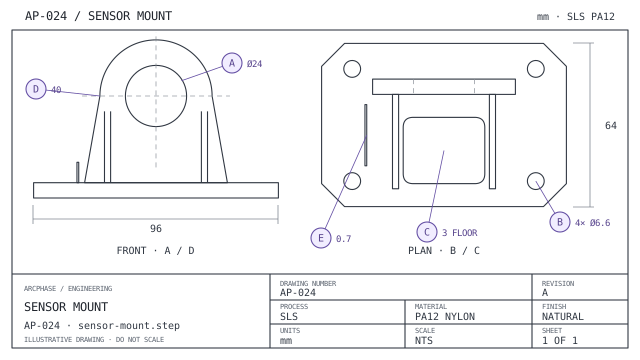
Your team adds a sensor mount for an automotive test rig, chooses SLS nylon, sets the quantity and attaches its drawing. With the optional portal, customers can start this same workflow themselves.
Part specificationAutomotive sensor mount REV A
sensor-mount.step
96 × 64 × 62 mm
SLS · Nylon PA 12
12 parts · natural finish
Drawing attached to part
AP-024 · Rev A
CAD intake
One part. Ready for the next step.
Your team adds a sensor mount for an automotive test rig, chooses SLS nylon, sets the quantity and attaches its drawing. With the optional portal, customers can start this same workflow themselves.
Staff intake or customer self-service → part specification
Quote on your customer’s behalf. Review CAD and drawings, configure the parts, and manage pricing and lead times in MES. Your team has the tools to win and run the work before you add customer self-service.
Once production starts, see ordered, manufactured, and shipped quantities against each part. Deliver a partial order without losing sight of what is still on the floor.
Build and cooling timers advance production stages automatically. Quantities stay connected to the order.
MANUFACTURING EXECUTION
Make the plan. Keep it close to production.
See what is waiting, what is running, and what needs attention. Allocate quantities from customer orders into builds, choose the machine and material, and keep the remaining work visible.
A technology-specific queue, build planner, and machine record in one workspace.
Technology-specific workspaces
Different processes. One operation.
Install the technologies you offer, then work with the parts, materials, and machines for each process. Keep SLS, SLA, and FDM production focused without losing the wider operation.
Manufacturing technologies
TechnologyStatus
SLS · Installed technology
Machine management
The machine behind the build. And the detail behind the machine.
See runtime and build parameters together. Move through materials, scheduled equipment work, and build history in the same machine record. Connect the material batch to the build so the parts retain their production history, even when an order runs across several builds.
P396 A ● Running
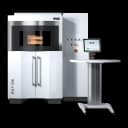
EOS P 396 · Selective Laser Sintering
Runtime
Recorded runtime and build configuration for this machine.
PA12 · Production run27%
Layer height
100 μm
Build volume
340 × 340 × 600 mm
Build parameters
Build temperature
170 °C
Chamber temperature
130 °C
Shrinkage X
3.14%
Shrinkage Y
3.21%
FULFILLMENT & DELIVERY
The parts leave. The record stays together.
Choose the quantities ready to ship, prepare packages, and select the carrier service. Keep shipment records, tracking, and documents connected to the order, including when it leaves in more than one delivery.
MES gives your team the tools to quote and run the job. Add the portal to let customers upload parts, configure requirements, place orders, and check progress themselves.
The portal opens a customer-facing workspace on top of the same connected work. Your team keeps control of pricing, review, production, and fulfillment in MES.